Technology
Viewing Holds on Your Student Account on the My Illinois State portal
Last modified 4/16/2026
You can view Holds on your student account through My Illinois State.
Before You Begin
As a student at Illinois State University, your account can have Holds placed on it. A Hold on your account means that you are restricted from performing one or more actions at Illinois State University. For example, the Hold named Admissions Enrollment Block indicates that you are currently blocked from registering for classes.
To resolve a Hold, you must review it and take the appropriate action. Once the Hold is resolved, it will be removed from your account. For example, if you have a Hold on your account due to an overdue payment, you must make the required payment to have the Hold removed from your account. Holds are sometimes linked to To Do List items. By completing the item on your To Do List, it will remove the related Hold from your account. However, not all Holds are tied to To Do List items. You can view all Holds on your account and To Do List items through My Illinois State portal.
View Holds in My Illinois State
To view Holds that have been put on your account My Illinois State, do the following:
- Log in to My Illinois State portal via Central Login.
- For more information about Central Login at ISU, please refer to: Central Login
- Locate the Holds Icon, which is located midway down the page on the left-hand side (See Figure 1).
Figure 1: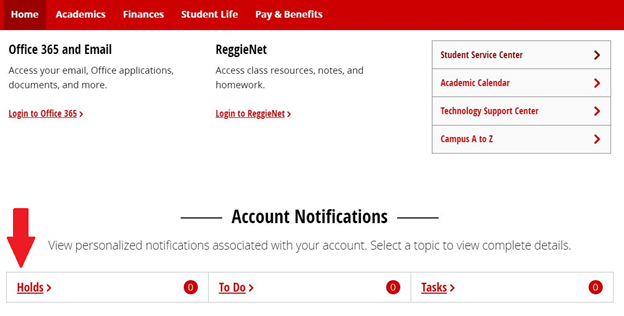
- Holds that have been placed on your account will be displayed in the box labeled Holds on the new page, with instructions on how to resolve each Hold underneath it. You will also see the department that can assist you in resolving the Hold (See Figure 2). You may need to contact the department that is listed to get additional assistance in resolving and removing the Hold.
Figure 2: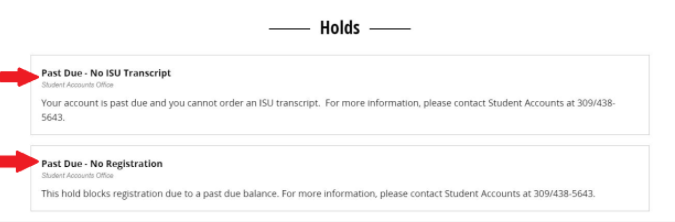
Additional Video Resources
The following are links to other videos that demonstrate or describe other features in My Illinois State portal:
- Access Your Student Center
- My Illinois State Finances Tab
- My Illinois State To Do List, Tasks, and Holds
- The Manage Classes Page
- The My Academics Tab at My Illinois State
- What is My Illinois State
How to Get Help
Technical assistance is available through the Illinois State University Technology Support Center at:
- Phone: (309) 438-4357
- Email: SupportCenter@IllinoisState.edu
- Submit a Request via Web Form: Get IT Help Form
- Live Chat: IT Help Live Chat
For questions about your holds, please contact the Office of the University Registrar.
Feedback
To suggest an update to this article, ISU students, faculty, and staff should submit an Update Knowledge/Help Article request and all others should use the Get IT Help form.