Technology
Microsoft Teams Meetings
Last modified 7/31/2026
Microsoft Teams Meetings is an online meeting solution within Microsoft Teams that provides a secure, collaborative space for virtual meetings, presentations, training sessions, and team discussions. Users can connect with colleagues through audio, video, screen sharing, and chat from virtually anywhere.
Microsoft Teams Meetings is an online meeting solution within Microsoft Teams that allows users to communicate and collaborate through audio, video, screen sharing, and meeting chat. Team Meetings supports virtual
- What can you do with Teams Meetings?
Microsoft Teams Meetings allows users to:
- Join or schedule online meetings.
- Host audio and HD video conferences.
- Share your screen, application, or individual windows.
- Collaborate using meeting chat.
- Record meetings and access transcripts and captions
- Use live captions and accessibility features to improve communication.
- Meeting Controls
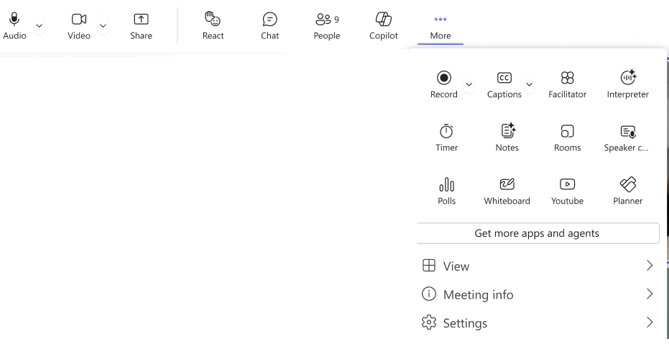
The meeting controls toolbar provides quick access to commonly used features duringa Microsoft Teams meeting. From the toolbar, users can manage their audio and video settings, share content, react during meetings, communicate through chat, view meeting participants, and access additional meeting tools.
The More menu provides access to additional meeting features, such as:
- Record
- Captions
- Notes
- Whiteboard
- Polls
- Meeting information
- Settings
- Additional meeting apps and tools
- Sharing Content
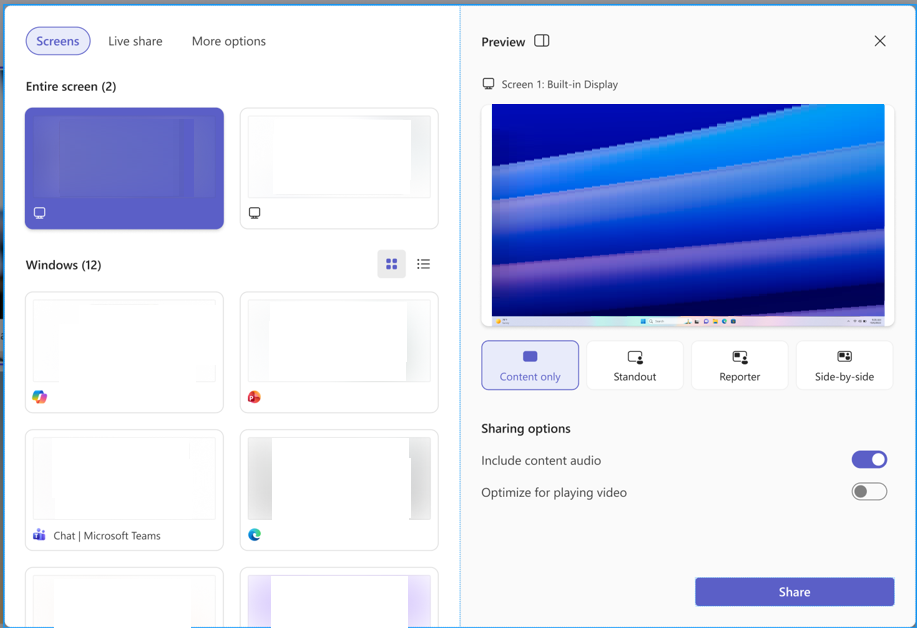
Teams Meetings includes a sharing panel that helps users present content during meetings.
Available features include:
- Tabs for selecting different sharing options.
- Live previews of available screens and windows.
- A preview of the selected content before sharing.
- Presentation layout options.
- Options to include content audio and optimize for video playback.
- A Share button to begin presenting the selected content.
- Availability
Microsoft Teams Meetings is available on:
- Windows
- MacOS
- Microsoft Teams for the web
- iOS
- Android
Some meeting features may vary depending on the platform or device being used.
- Accessibility
Microsoft Teams Meetings includes accessibility features designed to improve participation for all users.
Available accessibility features include:
- Live captions.
- Meeting transcripts (when available).
- Keyboard shortcuts.
- Screen reader support.
- Background noise suppression.
For additional accessibility resources, refer to:
- Navigating Teams Meetings in the Education LTI in Canvas
Teams Meetings can also be accessed from within the Microsoft Education LTI within your Canvas courses. For more information, please see:
- Additional Information
For more information about Microsoft Teams Meetings and available meeting features, please refer to the Microsoft Teams Meetings support documentation.
How to Get Help
Technical assistance is available through the Illinois State University Technology Support Center at:
- Phone: (309) 438-4357
- Email: SupportCenter@IllinoisState.edu
- Submit a Request via Web Form: Get IT Help Form
- Live Chat: IT Help Live Chat
Feedback
To suggest an update to this article, ISU students, faculty, and staff should submit an Update Knowledge/Help Article request and all others should use the Get IT Help form.