Technology
Viewing Vacation and Sick Leave Balances in iPeople
Last modified 4/23/2026
Off Campus Authentication Note
If you are off campus, iPeople will require an MFA request approval. Follow this link to set up your MFA if you still need to: MFA Info/Setup article
Full-time and part-time employees (but not student employees) accrue paid vacation and sick leave as they work at Illinois State University. You can view your available and/or used vacation and sick leave time in iPeople.
For more information about vacation and sick leave time, contact Human Resources at (309) 438-8311 or by email at HR@IllinoisState.edu.
View Your Vacation and Sick Leave Information
To view your vacation and sick leave information in iPeople, do the following:
- Log in to My Illinois State portal via Central Login.
- For more information about Central Login at ISU, please refer to: Central Login
- Click iPeople.
- Click Leave Balances (Figure 1).
Figure 1: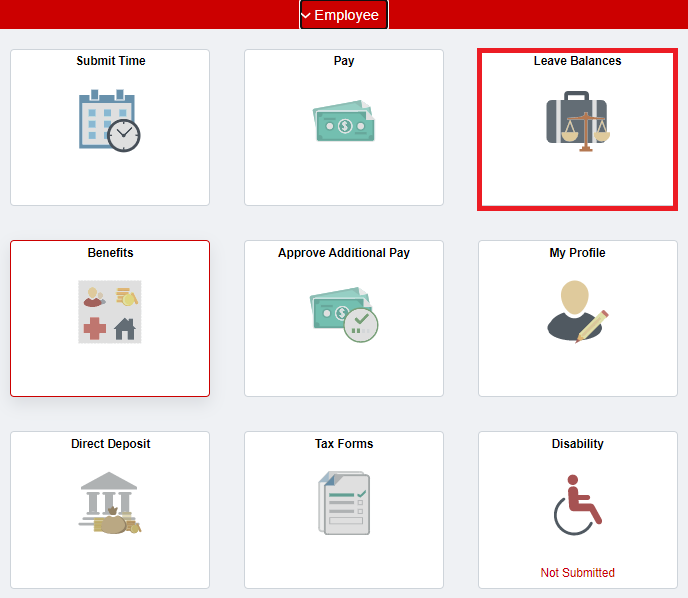
- Your Current Leave Balances are displayed. Use the tabs to switch between leave balance types (i.e., Vacation, Sick leave, etc.) (Figure 2).
Figure 2: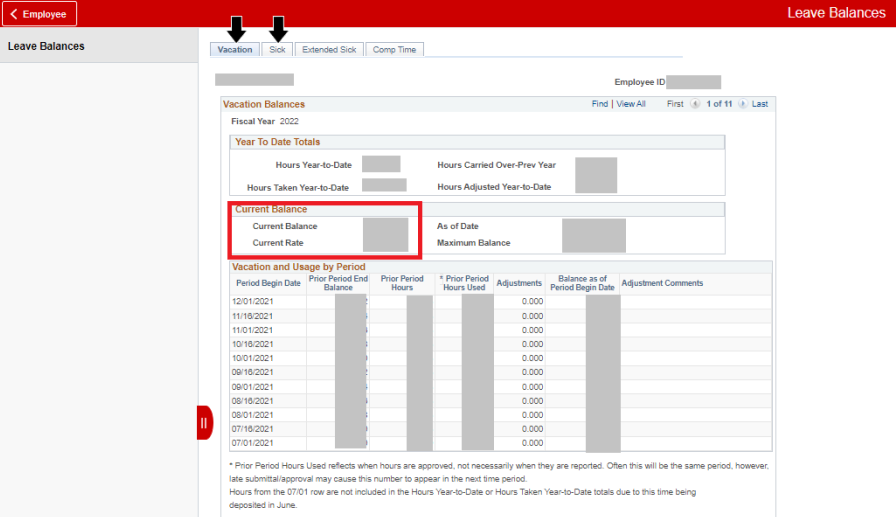
How to Get Help
Technical assistance is available through the Illinois State University Technology Support Center at:
- Phone: (309) 438-4357
- Email: SupportCenter@IllinoisState.edu
- Submit a Request via Web Form: Get IT Help Form
- Live Chat: IT Help Live Chat
Feedback
To suggest an update to this article, ISU students, faculty, and staff should submit an Update Knowledge/Help Article request and all others should use the Get IT Help form.