Technology
Update Your Personal Contact Information
Last modified 4/16/2026
Students
Students can update their Personal contact information in their Student Service Center.
To access the Student Service Center via My.IllinoisState.edu:
Off Campus Authentication Note
If you are off campus, Campus Solutions will require an MFA request approval. Follow this link to set up your MFA if you still need to. MFA Info/Setup
- Log into the My Illinois State Portal via the Central Login portal
- For more information about Central Login at ISU, please refer to: Central Login
- Click the Campus Solutions tab (Employee) or the Student Center tab (Student) (See Figure 1).
Figure 1: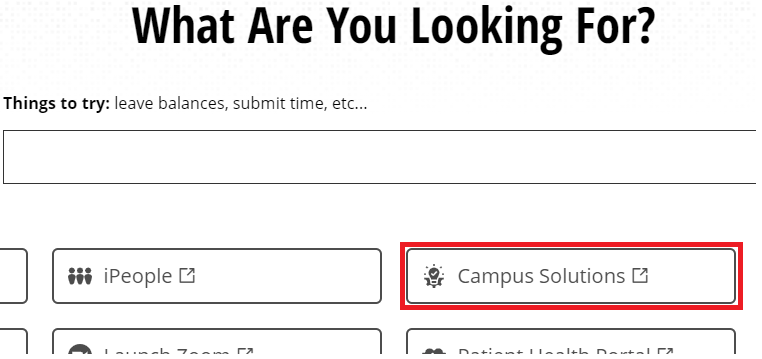
- Click the Profile Tile to update your personal Information (See Figure 2).
Figure 2: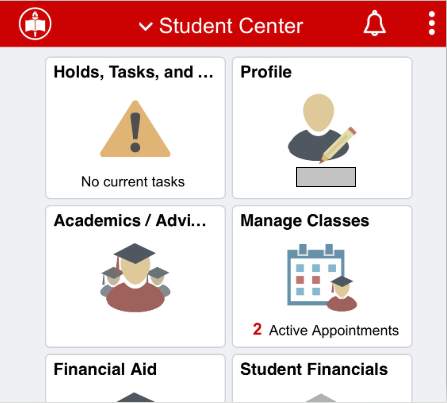
Update your Home or Mailing Address:
- Click Addresses on the left-hand side.
- Click the Address you wish to update.
- Enter the correct information in the pop-up Edit Address box, and click Save in the upper right-hand corner.
To update your phone number(s):
- Click Contact Details on the left-hand side. (Figure 3)
Figure 3: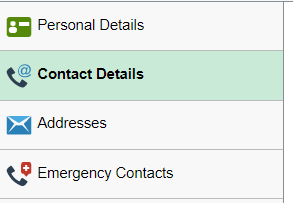
- Follow the steps to update your phone number and click Save in the upper-right corner when complete.
- If you wish to add a new or additional number, click the Plus sign + button under Phone. (Figure 4)
Figure 4:
- You will see this menu popup:
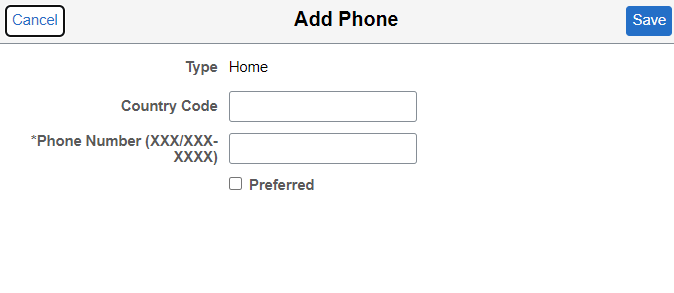
- If you wish to add a new or additional number, click the Plus sign + button under Phone. (Figure 4)
- To edit an already entered number click the arrows on the far right of the box that they're in. (Figure 5)
Figure 5:
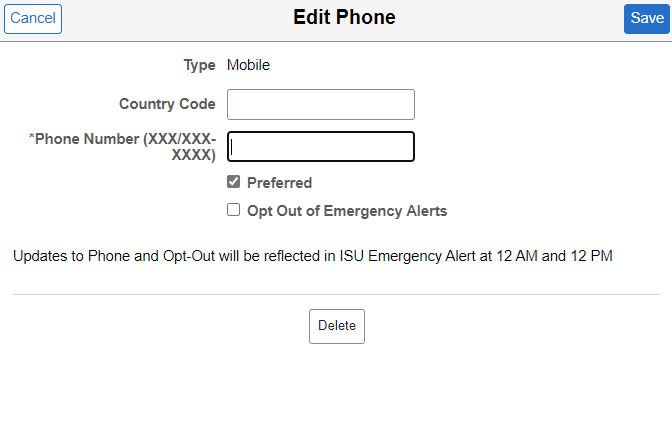
- From here you can add/edit a country code and edit the number that is already in the system.
More Info:
Information regarding student contact information changes may be found at: Updating your Personal Information - Registrar
Faculty and Staff
Faculty and staff can update their contact information online through the Personal Information Summary. The process for updating your personal information is the same as it would be for students, other than the first few steps, as an employee will have different options when accessing their Personal Information Summary.
To update your office phone number you will need to contact the Technology Support Center by phone at (309) 438-4357, through a service ticket at ITHelp.IllinoisState.edu or by email at SupportCenter@IllinoisState.edu.
Annuitants
Annuitants will be unable to update their contact information in My Illinois State. To update their contact information with ISU, they will need to contact Human Resources by phone at (309) 438-8311. Annuitants looking to update their contact information with the ISU Annuitants Association may reach out to their association contact.
How to Get Help
Technical assistance is available through the Illinois State University Technology Support Center at:
- Phone: (309) 438-4357
- Email: SupportCenter@IllinoisState.edu
- Submit a Request via Web Form: Get IT Help Form
- Live Chat: IT Help Live Chat
Feedback
To suggest an update to this article, ISU students, faculty, and staff should submit an Update Knowledge/Help Article request and all others should use the Get IT Help form.