Technology
ALEKS
Last modified 4/17/2026
McGraw Hill ALEKS is a research based, online learning platform that uses artificial intelligence to create personalized paths for every student. ALEKS is available at Illinois State University as a Learning Tool Integration (LTI) within the Canvas LMS.
Add ALEKS to your Canvas Course
Instructors may add Aleks to their Canvas course by following the instructions below:
- Navigate to your Canvas course.
- In the course navigation on the left, select Settings.
- In the course Settings, select the Navigation tab, and scroll-down to locate ALEKS in the hidden items section, and drag ALEKS up to the non-hidden section above (Figure 1):
Figure 1: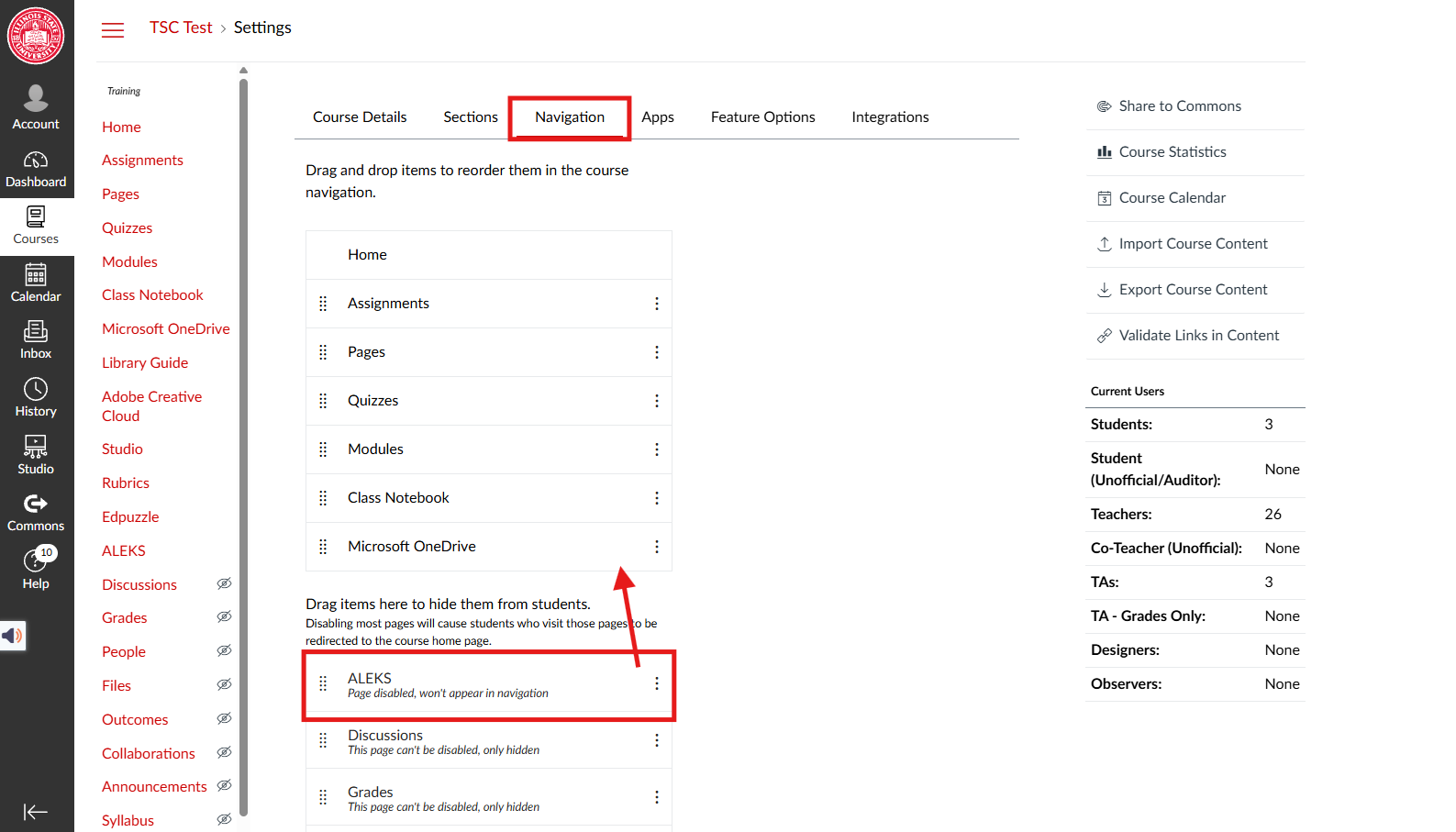
- Click Save at the bottom of the page.
- ALEKS will now show up in your course navigation bar on the left in instructor-view.
Software Licensing/Accessibility Notes
Licensed Use:
- Limited to Chemistry Department
- University College
Accessibility Message:
- Users may require accommodations with this tool, please consult with SAAS for students /ADA Coordinator for employees.
- Tool requires a pro-active accommodation plan, please consult with SAAS for students/ADA Coordinator for employees.
Resources (links to VPAT, Help resources):
For Additional Information
How to Get Help
Technical assistance is available through the Illinois State University Technology Support Center at:
- Phone: (309) 438-4357
- Email: SupportCenter@IllinoisState.edu
- Submit a Request via Web Form: Get IT Help Form
- Live Chat: IT Help Live Chat
Vendor support is available at:
Feedback
To suggest an update to this article, ISU students, faculty, and staff should submit an Update Knowledge/Help Article request and all others should use the Get IT Help form.