Technology
Account settings in Canvas
Last modified 5/15/2026
The settings page is the home of the information tied to your Canvas account. From here, you can change things like your pronouns, email address, and accessibility features.
Warning
Please note that the Account Settings page at Illinois State University may be different than the Canvas guides and what is available on the internet. Please contact the Technology Support Center for questions if you are unable to edit information on your profile.
- Open Account Settings
Figure 1: (Opening the Account shortcuts menu via the Canvas sidebar)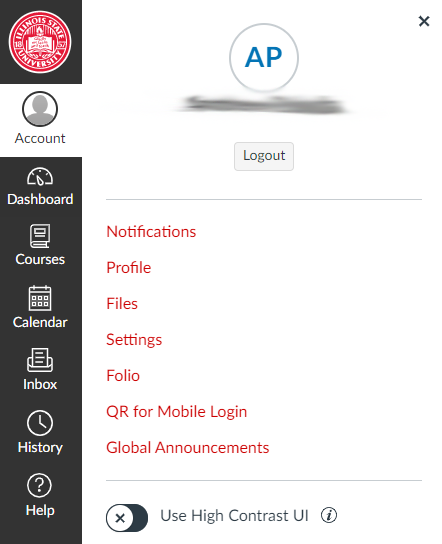
- Edit Your Account Settings
Figure 2: (The Canvas Account settings page)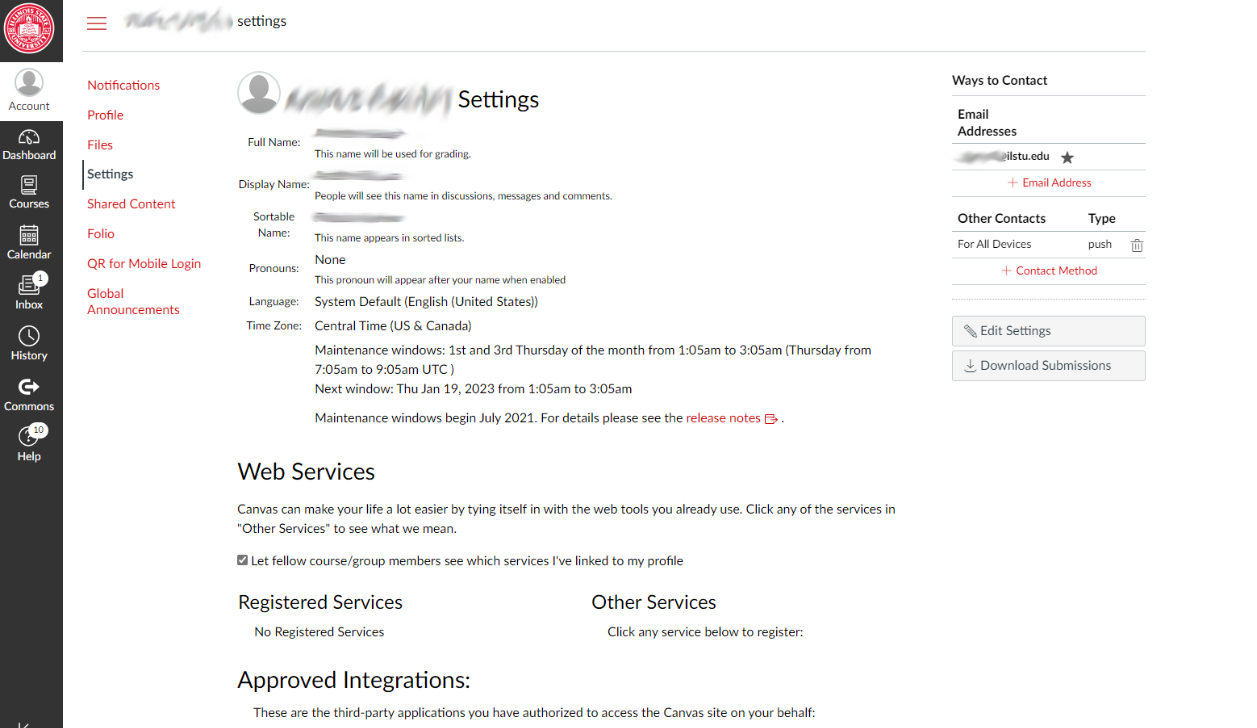
- Logging in to Canvas
- Additional Canvas Guides
- Student Guide - Instructure Community (canvaslms.com)
- What feature settings can I enable in my user acco... - Instructure Community (canvaslms.com)
- How do I add a profile picture in my user account ... - Instructure Community (canvaslms.com)
- Lesson 1: Account Basics - Instructure Community (canvaslms.com)
How to Get Help
Technical assistance is available through the Illinois State University Technology Support Center at:
- Phone: (309) 438-4357
- Email: SupportCenter@IllinoisState.edu
- Submit a Request via Web Form: Get IT Help Form
- Live Chat: IT Help Live Chat
Feedback
To suggest an update to this article, ISU students, faculty, and staff should submit an Update Knowledge/Help Article request and all others should use the Get IT Help form.