Technology
Microsoft Word for Mac - Visual Basic Error
If you are using Microsoft Word for Mac and you receive the below error (Visual Basic for Applications: Run-time error '4707'), you may take the steps below to attempt to resolve it.
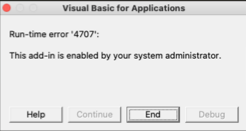
Resolve the Run-Time Error:
- Check to make sure you are running the latest versions of Microsoft Word, Adobe Acrobat, and Zotero (if applicable). If not, download and update those applications to the latest version.
- If you are running the latest versions of those applications and are still receiving the error in Word, search in your System Library for a file named LinkMaker.DOTM and delete the file. Relaunch Word and you should no longer receive the error.
How to Get Help
Technical assistance is available through the Illinois State University Technology Support Center at:
- Phone: (309) 438-4357
- Email: SupportCenter@IllinoisState.edu
- Submit a Request via Web Form: Help.IllinoisState.edu/get-it-help
- Live Chat: Help.IllinoisState.edu/get-it-help