Accessibility
Understanding Accessibility Check Report in Foxit PDF Editor
Last modified 8/27/2026
The Foxit Accessibility Check identifies common accessibility issues such as missing PDF tags, document titles, language settings, and alternative text. It also flags items that require manual review, including reading order and color contrast. While the accessibility checker is a valuable starting point, manual testing and review are still necessary to ensure a PDF is fully accessible. Though Foxit may identify missing PDF tags, it does not determine if the tag structure is correct this will require a manual check.
How to Run the Accessibility Check
Select Accessibility Tab
Navigate to and select the Accessibility tab
Run Full Check
Choose the Full Check option.
In the accessibility check options dialog, ensure all options are selected.
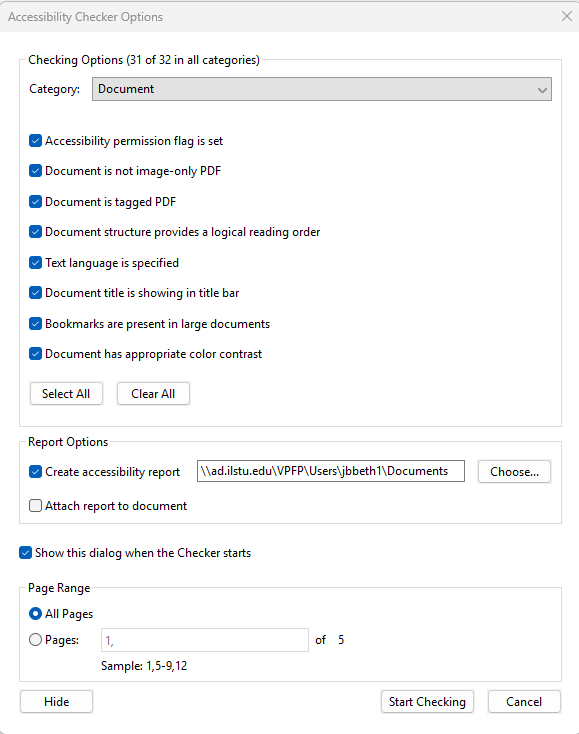 Choose Start Checking button to run the report.
Common Issues Reported in Foxit Accessibility Check
The accessibility check report is divided up into several catagories:
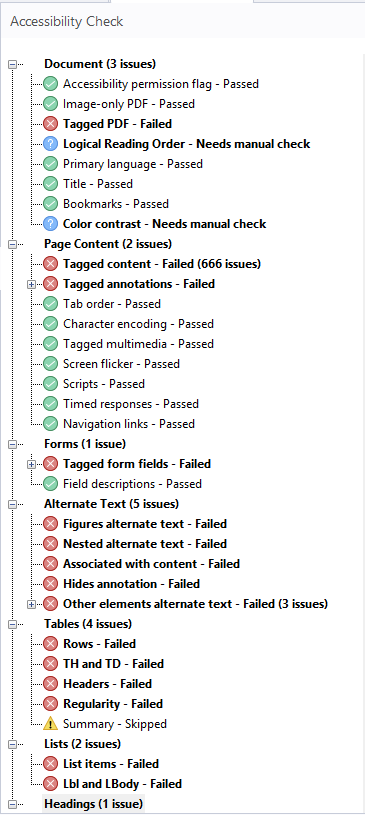
- Document - checks document-level accessibility settings such as if the PDF is tagged, has a document title, specifies a primary language and includes setting needed for assitive technologies.
- Page Content - Reviews the structure and organization of the content
- Forms - Evaluates form fields to ensure they are accessible, including presence of field labels and tool tips along with keyboard accessibility.
- Alternate Text - checks images, graphics and figures to determine if they include alternative text descriptions
- Tables - Reviews table structure for properly labeled table headings and data cells.
- Lists - Checks whether bulleted or numbered lists are correctly identified and tagged as lists.
- Headings - Evaluates the document heading structure to ensure headings are properly tagged.
*Remember automated checks are not always accurate. Please take a moment to review your doument manually.
Feedback
To suggest an update to this article, ISU students, faculty, and staff should submit an Update Knowledge/Help Article request and all others should use the Get IT Help form.