Accessibility
Authoring Accessible Math and Equations
Last modified 1/28/2026
Accessible mathematics and equations means ensuring that the meaning of mathematical content is available to everyone, including people who use screen readers or cannot see visual information. It does not mean simplifying the math or changing notation. It means making sure that key ideas—especially those shown in equations, graphs, and diagrams—are also communicated in words text. When math relies only on visuals, some people are excluded. When math is explained clearly in text, more can engage with it: students, researchers, as well as, anyone encountering the material in different formats.
At its core, accessible math is about good communication—the same clarity we aim for when teaching or writing, extended to all learners.
- Intentional design
- Clear narrative explanations
- Thoughtful alt text
- Spoken-friendly math language
- Inclusive visual design choices
Complex Images
Most mathematical figures are "complex images." Any figure must be understandable from text alone. These diagrams, graphs, charts, geometric figures, must include:
- a clear explanation of the visual in the caption or body text
- an informative title and caption
- a short alt text that points users to the longer text explanation
Write a Short Alt Text
It recommended that for mathematical equations the alt text supports navigation, not deep understanding. Deep understanding comes from the clear explanation in the body text of the webpage, document, course page, etc. Alt text may reference the body text, but it cannot replace it.
Effective short alt text should:
- Be 1–2 sentences
- Describe the type of image
- Summarize the key takeaway
- Point users to where the full explanation exists (caption or body text)
- Stay under ~150 characters where possible
- Emphasize meaning over appearance
Alt Text Must be Spoken, Not Symbolic
Screen readers don’t interpret symbols the way humans do. Symbols and equations in alt text should be written out as they would be read out loud.
Visual equation and Descriptive Caption Example 1
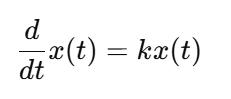
The rate at which the quantity x changes over time is proportional to its current value. When k is positive, x grows exponentially over time; when k is negative, x decreases.
Visual equation and Descriptive Caption Example 2
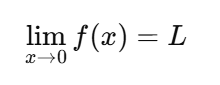
The limit of f of x as x approaches zero equals L
Visual equation and Descriptive Caption Example 3
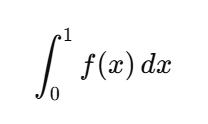
The integral of f of x from zero to one
Why it matters
- The mathematical meaning is explained in words
- A reader does not need to see the equation to understand the idea
- The explanation matches how an instructor might explain it in class
Color Cannot be the Only Way to Convey Meaning
- Don't rely on color alone to show differences or relationships
- Use patterns, textures, labels, line styles, or shapes in addition to color
- Check to make sure Contrast ratios meet minimum WCAG requirements (3:1 for graphics, 4.5:1 for text)
Make Data Behind Complex Plots
Accessibility goes beyond visuals, make sure data access is available for non-visual users. For complex plots, authors may need to:
- Include data tables in appendices
- Provide links to datasets
- Offer supplemental files when data is too large for alt text
LaTeX Choices Affect Accessibility
Not all LaTeX is accessibility-safe. Clean math markup improves downstream accessibility. Publishers typically use LaTeX or MathJax speech output for equation accessibility.
- Well-structured LaTeX is critical
- Many common LaTeX packages are not compatible with accessible publishing workflows.
- Use publisher-approved templates and packages
- Alt text support varies depending on how figures are created
Reference
- Author Guidelines for Preparing Accessible Mathematics Content
- American Mathematical Society: Guidance for Making Mathematics Accessible Online
Feedback
To suggest an update to this article, ISU students, faculty, and staff should submit an Update Knowledge/Help Article request and all others should use the Get IT Help form.