Information Security
Financial Aid or Grant Fraud
Last modified 5/21/2025
🧠 Overview
Phishing emails that falsely claim students have been awarded grants, scholarships, or financial aid from well-known organizations.
These scams are designed to steal personal information and may lead to identity theft or additional fraudulent activity.
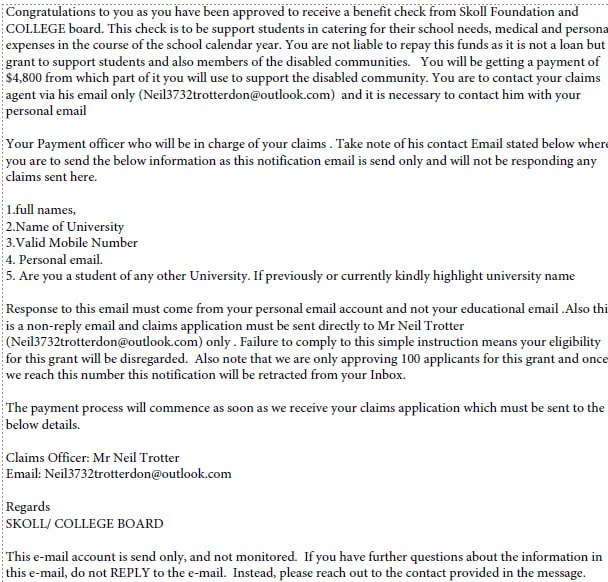

Note: Do not respond or engage with messages that look like this.
❗ Red Flags in This Scam
| 🔍 Indicator | 🚩 Description |
|---|---|
| Suspicious Email Address | Uses a free Outlook account (e.g., Neil3732trotterdon@outlook.com) instead of an official university or organization domain. |
| Urgency and Scarcity Tactics | Claims only “100 applicants” will be approved, and threatens to retract the offer if not claimed quickly. |
| Request to Use Personal Email | Instructs users not to reply from their school email, likely to bypass institutional monitoring. |
| Requests Personal Info | Asks for full name, university, phone number, and more — all data useful for identity theft or advancing the scam. |
| Poor Grammar and Formatting | Multiple grammatical issues, inconsistent language, and unprofessional formatting. |
| Fake Institutional Affiliation | Misuses the name of “Skoll Foundation” and “College Board” without any legitimate connection. |
🎣 What They're Trying to Do
Phish for personal data (name, email, phone, university info)
Possibly initiate advance-fee fraud (asking for “processing fees” later)
✅ What You Should Do
Do not respond to the message.
Do not provide any personal information.
Report it immediately to: informationsecurity@ilstu.edu or abuse@ilstu.edu
Mark the message as phishing or spam in your email client.
🛡️ Protect Your Nest Tips
Legitimate university or grant communications will never come from personal Outlook or Gmail accounts.
If you're unsure about a message, pause and ask. The ISO is here to help.
Always verify financial offers through official university channels or known partners.
Stay alert, and protect your nest. 🐣
Last updated: 21May2025
Feedback
To suggest an update to this article, ISU students, faculty, and staff should submit an Update Knowledge/Help Article request and all others should use the Get IT Help form.