Information Security
Fake Job SMS
Last modified 7/29/2025
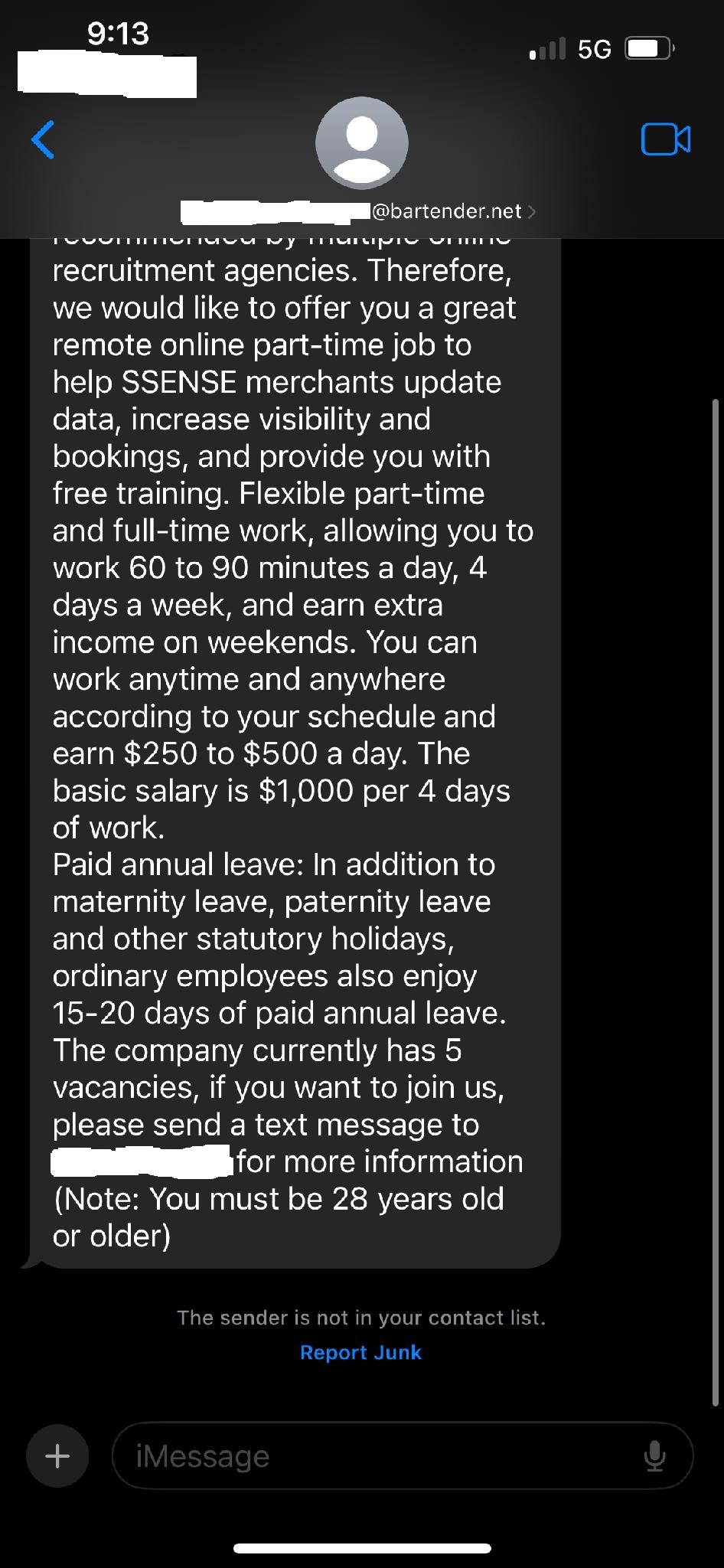 Key Indicators of a Scam
Unknown Sender Domain
From:
***@bartender.net— not a corporate domain or domain related to the corporation tied to the offering..Legitimate companies use branded domains.
Too-Good-to-Be-True Compensation
Offers $250–$500 per day for 60–90 minutes of work.
“$1,000 for 4 days of work” is an unrealistic wage for the job description (data updates & visibility).
Urgency + Scarcity Tactics
Mentions "5 vacancies" and pressures the recipient to act by texting a number.
Request for Direct Contact Outside Trusted Platforms
Asks you to text a phone number, bypassing typical secure job application platforms.
Unusual Age Requirement
States: “You must be 28 years old or older” — which is arbitrary and suspicious.
Spoofing of Legitimate Company Name
References SSENSE, a known brand, likely to build false credibility.
Security Risks
| Risk Category | Description |
|---|---|
| Phishing | If you respond, you may be asked for personal information, banking details, or to install malicious apps. |
| Financial Fraud | Scammers often claim to send a “starter payment” and then ask for money transfer back via gift cards, crypto, etc. |
| Identity Theft | If you share a resume or ID, your data could be used to open accounts or steal your identity. |
| Malware Risk | If continued, this scam could lead to links or apps that infect your phone or computer. |
Recommended Actions
Do NOT respond to the number or email.
Report this as junk or spam via your messaging app or carrier.
Block the sender to prevent future contact.
Delete the message after reporting.
If you interacted at all, consider:
Scanning your device for malware.
Monitoring for suspicious activity on bank or credit accounts.
🔗 Reference for ISU Users
If this message was received on a university-managed device or number:
Forward it to informationsecurityoffice@ilstu.edu
Feedback
To suggest an update to this article, ISU students, faculty, and staff should submit an Update Knowledge/Help Article request and all others should use the Get IT Help form.