Information Security
Business Email Compromise (BEC)
Last modified 5/22/2025
What Is BEC?
Business Email Compromise (BEC) is a type of cyberattack where criminals impersonate trusted individuals—such as university leaders, vendors, or staff members—to trick recipients into transferring money or divulging sensitive data. These messages often appear highly convincing.
The FBI have estimated that between October 2013 and December 2023, over 300,000 instances of BEC occurred globally with a total loss of over $55 billion. Many incidents involve a loss of $100,000 - $200,000, but there have been several multi-million dollar loss incidents as well.
BEC Attack Chain
While there are a few variations on precisely how BEC attacks are executed, the following diagram represents an effective method that is increasingly being seen.
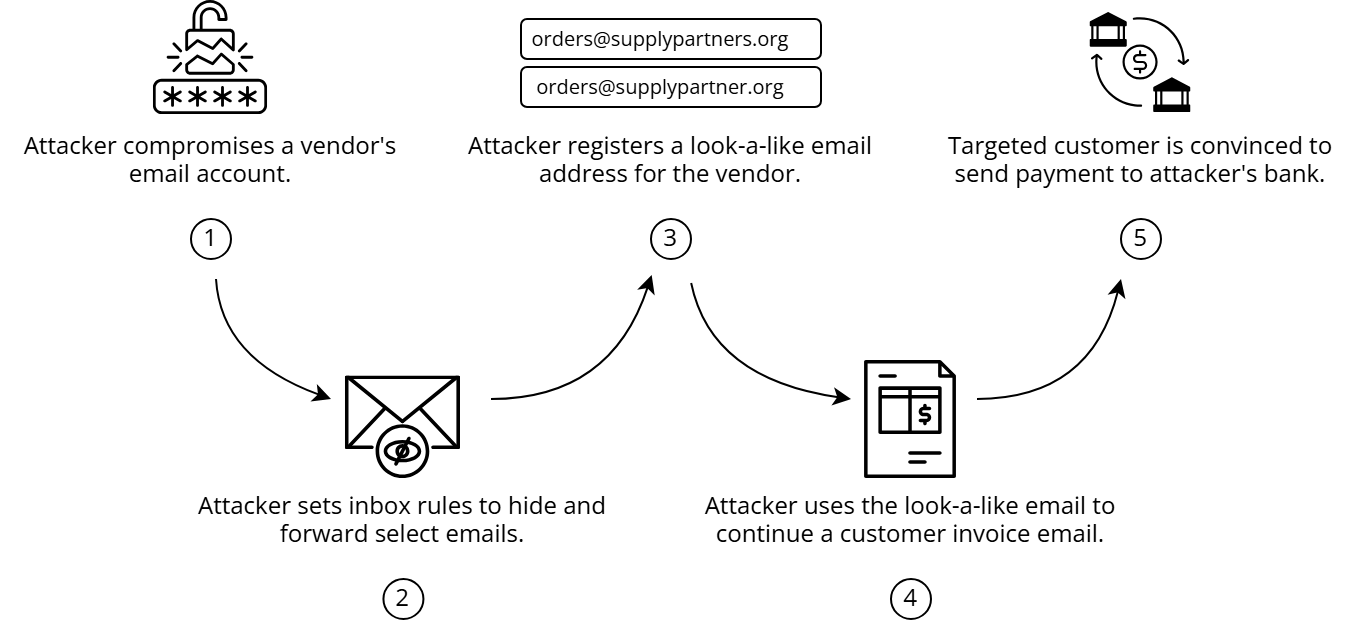
In 2021, the FBI released an advisory specifically detailing the impersonation of construction companies with this attack pattern. Industry data aggregators and government contract portals were used to harvest data providing company profiles, job specifications, and financial details to formulate plausible fraudulent invoices.
The Tactic: Vendor Change of Bank
A common BEC scenario involves email requests to change payment or fund disbursement instructions. Attackers often pose as vendors or internal departments and send requests near deadlines to reduce scrutiny. They may even create look-a-like or spoofed email addresses of the vendor they are impersonating.
“Hi, we had to change our bank account. Please wire this month’s payment to the new account listed below. It’s urgent!”
How to Stay Protected
✅ Always verify any financial change request via a known phone number—not one included in the suspicious email.
✅ Be cautious of urgency or pressure to act immediately.
✅ Never click links or download attachments in unexpected finance-related emails.
✅ Require a secondary approval process for financial disbursements.
✅ Report suspicious messages immediately.
For ISU Units: Strengthen Your Defenses
- Use Microsoft Defender's phishing filters and impersonation protection.
- Enable MFA for all university email accounts.
- Use Inbox Rules to verify domains of vendors
- Use ISU's process for secure vendor onboarding.
- Routinely audit fund transfer workflows for risks.
Final Tip
If someone asks you to reroute a payment—even if it looks like your boss or a vendor—always verify the request through a separate communication channel.
Report Suspicious Activity
Report phishing or BEC attempts by:
- Using the “Report Message” button in Outlook
- Email abuse@ilstu.edu or informationsecurity@ilstu.edu
Additional Reading
Feedback
To suggest an update to this article, ISU students, faculty, and staff should submit an Update Knowledge/Help Article request and all others should use the Get IT Help form.